Ribbon mascotRibbon
DemoPricingShortcutsGuidesFAQsChangelog
Download
Ribbon mascotRibbon

A scrolling window manager for Mac. Windows sit on one strip: scroll instead of shrinking.

Support: [email protected]

  • Listed on MacPip
  • Featured on TryMacApps
  • Ribbon is featured on MacBase
  • Featured on DanielLaunches
  • Featured on CodeHype
  • Ribbon on DodoLaunch
  • Featured on PickMacApps
PricingDownloadShortcutsGuidesChangelogLicensePrivacyTermsRefunds

Compare

Ribbon vs yabaiRibbon vs AeroSpaceRibbon vs AmethystRibbon vs ChainYourMacRibbon vs OmniWM

Guides

4 way split screenAeroSpace alternativesAeroSpace on MacAeroSpace vs yabaiAmethyst alternativesBest Mac window managersBest scrolling window managersBetterSnapTool alternativesHow to use AeroSpaceHyprland for MacKeyboard shortcutsLoop alternativesMac tiling window managersMac window managersMacBook window managerMagnet alternativesMoom alternativesMultiple displaysNiri for MacOrganize windowsPaperWM for MacPrivacyRectangle alternativesScrolling window managersSplit screen on MacSplit screen optionsSplit screen shortcutStage Manager alternativesTrackpad gesturesTroubleshootingWhat a window manager isyabai with SIP onAll guides

© 2026 Ribbon · macOS 14+ · Apple siliconBuilt on top of Paneru

Guides

How to Use AeroSpace Mac

How to use AeroSpace Mac: Homebrew, the Accessibility permission, a TOML config, workspaces, and the day-one keys from the official defaults.

Ask AI about this guide

OpenAIClaudeGrokPerplexityGoogle Gemini

How to use AeroSpace Mac: install it with Homebrew, allow Accessibility, then use the default keys. You do not need a config file on day one. You do not turn off System Integrity Protection.

What the app is, and who should skip it, is in AeroSpace on Mac.

Install

You need macOS 13 or later. Quit any other window manager first, and turn Stage Manager off. Two apps that both move windows will fight.

  1. Install Homebrew if you do not have it.
  2. Run:
brew install --cask nikitabobko/tap/aerospace
  1. Open AeroSpace. The app is not notarized. The cask handles that. A zip from the releases page may need a right-click → Open, or xattr -d com.apple.quarantine /Applications/AeroSpace.app.
  2. Allow it in System Settings → Privacy & Security → Accessibility. If windows do not tile, toggle the permission off and on, then reopen the app.

AeroSpace does not start at login until you set start-at-login = true or add it to Login Items.
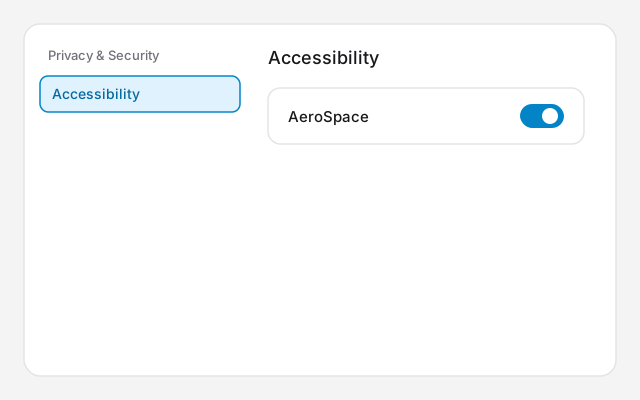
Diagram of System Settings. Privacy & Security is in the sidebar, Accessibility is selected, and AeroSpace has its permission switch on.
Diagram of Privacy & Security, then Accessibility. Turn permission on for AeroSpace.

Day-one keys

Option is the modifier. The config calls it alt.

What you wantKeys
Focus left, down, up, right⌥H, ⌥J, ⌥K, ⌥L
Move the window⌥⇧H, ⌥⇧J, ⌥⇧K, ⌥⇧L
Resize⌥Minus, ⌥Equal
Side by side, or stackedOption-/
Workspace 1 to 9⌥1 through ⌥9
Send the window to a workspace⌥⇧ and the number
Back to the last workspace⌥⇥
Service mode⌥⇧-;

⌥F is workspace F, not full screen. In service mode, Escape returns to the normal keys, R resets the layout, and F floats the focused window. Backspace closes every window but the current one.

Workspaces

Press ⌥1 and open two apps. They tile. Press ⌥2. The screen clears, with no Spaces animation. Press ⌥1 to come back. Press ⌥⇧2 to send the focused window to workspace 2 without following it.

These are not macOS desktops. Mission Control will not show nine tidy Spaces. On more than one monitor, leave a free bottom corner on each screen in System Settings → Displays → Arrange, or hidden windows show up on the wrong display.

The config file

With no file, you are on the built-in defaults. Do not create an empty file. A config replaces the key list.

When you want to change something:

  1. Copy the default config from section 2.3 of the guide into ~/.aerospace.toml. The other path is ~/.config/aerospace/aerospace.toml. Use one, not both.
  2. Change one line.
  3. Run aerospace reload-config. Saving the file does nothing until you turn on auto-reload-config and reload once.

If a key does nothing

Quit skhd, and check Karabiner and Raycast. They listen for the same kind of chord. Focus is H, J, K and L, not the arrow keys. If every key is dead, you may be in service mode. Press Escape. If that fails, rename ~/.aerospace.toml and reload. The defaults come back.

If tiles get too narrow, use fewer windows per workspace. A scrolling strip is a different app. Ribbon vs AeroSpace is that comparison. AeroSpace vs yabai is the comparison if you want another tiler.

Related guides

  • AeroSpace Mac: Free i3-Style Tiling
  • Ribbon vs AeroSpace: Mac Window Manager
  • AeroSpace vs yabai: Which Mac Tiler to Pick

FAQs

Short answers for this guide. Setup and license links if you need the next step.

Ask AI about this guide

OpenAIClaudeGrokPerplexityGoogle Gemini

Can’t find what you’re looking for? See the Mac Setup page or write from the app’s About screen.

With Homebrew: brew install --cask nikitabobko/tap/aerospace. Then open the app and allow it under System Settings → Privacy & Security → Accessibility.

How do I install AeroSpace?
With Homebrew: brew install --cask nikitabobko/tap/aerospace. Then open the app and allow it under System Settings → Privacy & Security → Accessibility.
Where is the AeroSpace config?
Either ~/.aerospace.toml or ~/.config/aerospace/aerospace.toml, not both. With no file, the built-in defaults are used. A file you create replaces those key bindings.
What are the default AeroSpace keys?
Option-H, J, K and L move focus. Option-Shift with those keys moves a window. Option-1 through Option-9 switch workspaces. Option-F is workspace F, not full screen.
How do I reload the AeroSpace config?
Run aerospace reload-config. Auto-reload is off in the default config until you set it and reload once by hand.

Can’t find what you’re looking for? See the Mac Setup page.

All guides